Do you own a business and want to legalize its operation? The government of Kenya has made the business registration process convenient and straightforward for everyone. Whether you are a Kenyan or foreigner, you can register your business online.
In Kenya, the Business Registration Service (BRS) operates under the Office of the Attorney General and Department of Justice. You have to follow several procedures to have your business recognized. It is also vital to have a permit to operate your business well. As a result, you can run your business smoothly and make profits.
Asking yourself how to register a business in Kenya? Here are the ten simple steps to register your business online:
Table of Content
show
1. Create an eCitizen Account
eCitizen is an online platform where the government of Kenya conducts most of its official roles. First, log in to the portal. Then feed in your Kenyan ID number, a working email, and an active mobile phone number for OTP verification.
Besides, upload a passport-size photo of yourself. Provide a recent photo, one that has been taken at most six months before you register your business. Finally, navigate to the Business Registration Service page to start the registration process.
2. Choose a Business Type
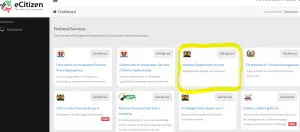
The eCitizen BRS portal allows you to select the type of business you want to operate. From the Business Registration Service page, click on “Make Application.” Then select the appropriate registration type.
It is a crucial requirement for your business registration. Depending on your needs, you can choose:
-
Business Name (sole proprietorship or partnership) — KES 950
-
Private Limited Company — KES 10,650
-
Public Limited Company — KES 10,650
-
Limited Liability Partnership — KES 25,000
-
Company Limited by Guarantee — KES 10,000
-
Unlimited Company — KES 20,050
-
Branch of a Registered Foreign Company — KES 7,550
A Business Name is suitable for a small, owner-run venture. A Private Limited Company is the most common structure for businesses that want separate legal personality, limited liability, and credibility with clients and investors.
3. Business Name Registration
Your business needs a unique name. For instance, if it is a fashion company, you can call it Fleeky Fashions. Make sure that the name is not close to other registered business names. The government rejects similar business names.
BRS has merged name reservation and business registration into one online step. Submit your choice of three preferred names together with the full application. The system will automatically allocate the first available name.
You will get feedback on your business name within one to two days. Once a name is accepted, the Registrar will reserve it for 30 days. Therefore, you have a whole month to complete your business registration process.
You need to pay KES 150 for the name search. You can pay online using M-Pesa, debit card, or credit card through the eCitizen portal. Keep checking the portal for payment approval.
4. Fill in Form CR1 (Business Registration Form)
It is the fourth eCitizen business registration step. Please provide your company’s name together with its office location. Also, the form requires the names and other personal details of the company’s directors and shareholders. You should give the details for both local and foreign partners.
Besides, you need to scan the shareholders’ IDs and their passports. Afterward, attach them to the CR1 form. Make sure that you have filled in all the details and given accurate information.
For a private limited company, the BRS portal will also generate Form CR2 (Memorandum of the Company with Share Capital). Review and confirm this form as part of your application.
5. Provide the Registered Office Address via Form CR8
Complete form CR8, which indicates the company’s official registered office address. You can download the document from the BRS portal after entering your company details online.
On the form, fill in your company’s name and its business type. Also, provide the registered office address in Kenya. If you have foreign directors, provide their residential address details too. Finally, sign the form and date it. Your business registration process continues.
6. Complete the Statement of Nominal Capital and Beneficial Ownership Declaration
The BRS portal requires you to declare your company’s share capital structure. Indicate the nominal share capital, the value of each share, and how the shares are divided among shareholders. If your business has sold shares to the public, demonstrate the shares’ division and their amount.
In addition, you must provide beneficial ownership information. Under Section 93A of the Companies Act, 2015, every company must declare its beneficial owners, the natural persons who ultimately own or control the company. The BRS portal will generate a beneficial ownership form (such as BOF1) as part of the application flow. Fill this in accurately.
7. Pay the BRS Registration Fee
It is a crucial step in your business registration process. Once your application details are complete, the BRS portal will generate an invoice for the registration fee.
For a Business Name (sole proprietorship), the total fee is KES 950. For a Private Limited Company, the fee is KES 10,650. Other structures have different fees as listed in Step 2.
Pay the fee online through the eCitizen portal using M-Pesa, debit card, or credit card. The live portal invoice is your final payment reference. Keep the transaction record for your files.
Note: The Kenyan government abolished stamp duty on the initial nominal share capital of a company on incorporation. You do not pay a separate stamp duty fee for standard company registration.
8. Create or Adopt a Memorandum and Articles of Association
The Memorandum of Association shows your business’s name, objectives, location, and value of each share. Also, it indicates the number of shareholders in your company. On the other hand, the Article of Association describes the rules and regulations of your company. It outlines the powers and responsibilities of each company’s member together with their rights.
For standard private limited companies, the BRS portal now offers a model template for the Memorandum and Articles of Association. You can adopt this model directly within the portal, which auto-generates Form CR2. This saves time and legal costs.
If your company has a special share structure or unique governance needs, you may ask an advocate or company secretary to draft custom Memarts. After completion, file the documents through the portal.
9. Upload the Completed Documents via the eCitizen/BRS Portal
As you come to the end of your business registration process, have all the forms you filled. You should have the CR1, CR2, CR8, Statement of Nominal Capital, and beneficial ownership documents. Make sure you have filled in all the details and signed every form clearly.
Scan the signed forms in clear, legible quality. Upload them directly through the eCitizen/BRS portal. There is no need to mail physical documents or visit the Registrar’s office in person, the entire process is digital.
10. Download your Business Certificate from the eCitizen Portal
It is the final step of your business registration process. Once your documents are received, the Registrar reviews them. BRS lists the review period as 3–5 working days for a complete private limited company application. In practice, allow 5–14 working days depending on application completeness and any queries from the Registrar.
A successful review leads to your official business registration. Also, your business certificate goes online. You can download the Certificate of Incorporation and other registration outputs from the eCitizen portal.
After a successful business registration process, you can run your business in Kenya. Remember to complete your post-registration obligations, including obtaining a KRA company PIN, registering for eTIMS, and applying for a county business permit where required. It is a step worth taking. Before you register, see our comparison of business in Kenya and the key factors to consider before starting a business in Kenya.
Please follow and like us: